Splitting PO based on production plan use case for Claude for Excel
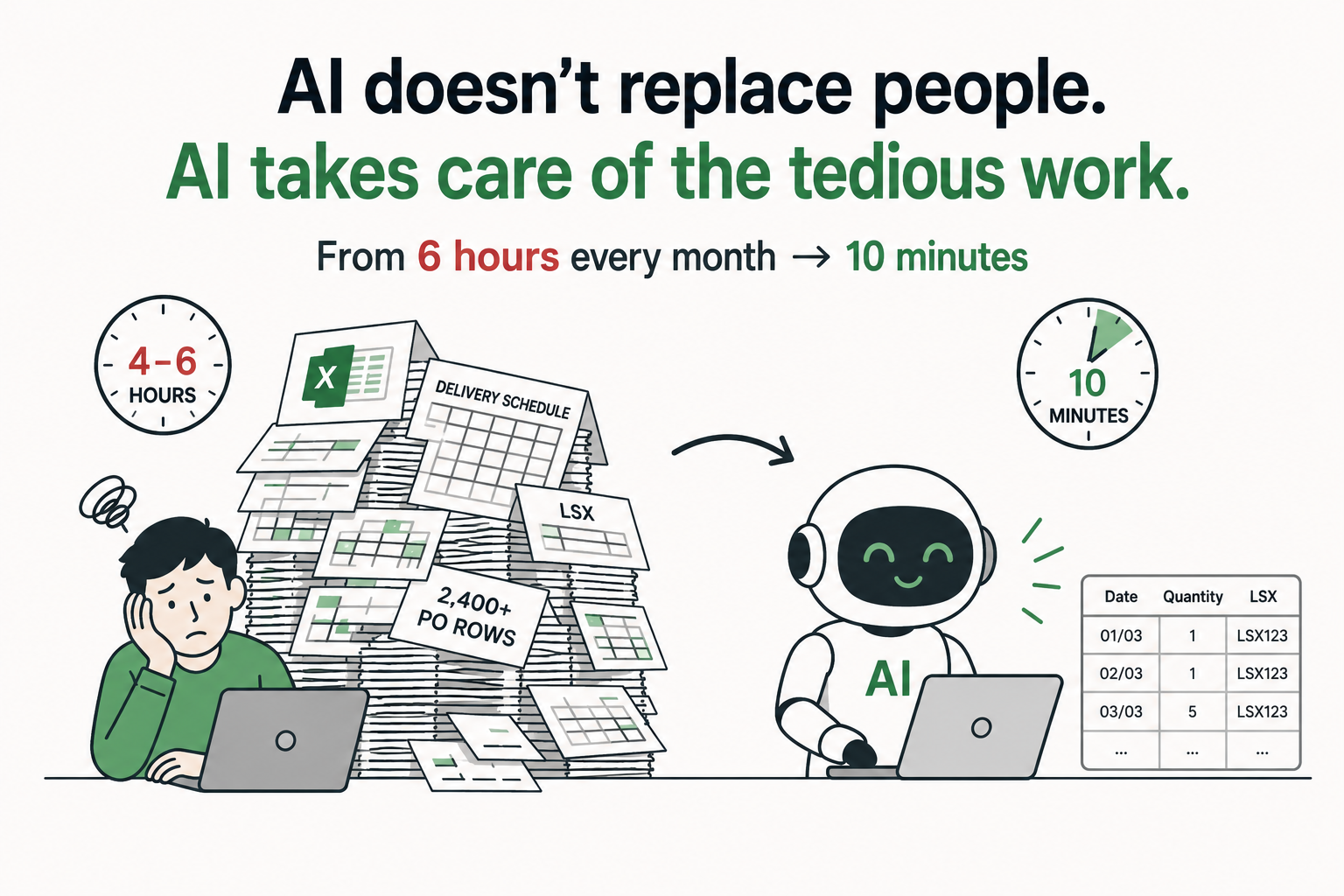
There’s a category of work that looks like nothing from the outside — just some Excel files, some tabs, some columns. But the person doing it knows: this is the kind of work that can’t be skipped, takes half a day, and nobody thanks you for it because it’s just “supposed to happen.”
My client is a manufacturing company. Every month, once the planning team finalizes the delivery schedule for that month, someone has to sit down and do one thing: cross-reference the new schedule against all open POs, then break each PO line into the actual delivery dates.
Sounds simple. But it’s very time consuming.
The flow
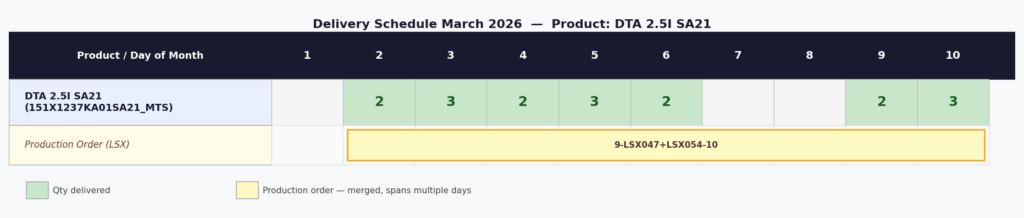
They have two Excel files. The first is the delivery schedule — one sheet per month, each product on a row, each column a day of the month, the number in each cell being the quantity delivered that day. Below each quantity row is an LSX row — a production order code — merged across multiple cells, spanning several days.
The second file is the delivery tracking sheet. Over 2,400 rows. Each row is a PO line: item code, quantity, scheduled delivery date, LSX, weight, pallet count, everything. And the file is named “GE 2026 Delivery Tracking — unallocated.”

That word “unallocated” says it all.
When the March schedule is ready, any PO with March delivery dates where the delivery date column is still blank — those are the lines that need to be “split.” Splitting means: take one PO line, cross-reference the delivery schedule, then break it into multiple sub-lines matching the exact delivery dates, quantities, and LSX codes.
For example: a PO has 6 units of item A due in March. The schedule says: deliver 1 on the 1st, 1 on the 2nd, 5 on the 3rd. So that single PO line becomes 3 lines — 1 unit on 01/03, 1 unit on 02/03, 4 units on 03/03. (The remaining 1 from the 5 scheduled on the 3rd rolls over to the next PO.)
They were doing this by hand. Every month. About 4 hours each time.
What I saw when I looked at it
When the client described the workflow, my first thought wasn’t “let’s use AI.” It was: this is a data transformation problem — you need an intermediate step to flatten the delivery schedule from a wide format (many date columns) into a long format (one row per delivery date) before you can use it to allocate POs.
The problem is that the delivery schedule file has a fairly complex structure: quantity rows and LSX rows interleaved, LSX as merged cells spanning date ranges, some products grouping multiple item codes in a single cell (meaning the quantity needs to be split equally), and not every day having a delivery.
Three years ago I would have written a Python script. Half a day of work, it would run, but the client couldn’t use it independently, and if the format changed next month we’d have to fix it.
Instead, I used Cowork with the Excel files and two prompts.
Step 1 — Extract the schedule into a readable format
Before allocating to POs, there’s an intermediate step: read the delivery schedule sheet and output a clean, structured file that’s easy to process.
Here’s the prompt I used:
Objective
Look at sheet 03.2026. Based on this plan, create a new file “03.2026 – Breakdown” with the following:
- Process each product in sheet 03.2026 from top to bottom. For each product, the first column will be in the format “Product Name (item_code_1, item_code_2…)”. For each item_code, create a section in an .md file with the title “Product Code: (#item_code)”. Each section contains a table with columns “Date”, “Quantity”, “LSX”. Rows are extracted from sheet 03.2026 as follows:
- The columns to the right of each product are the daily delivery quantities for that product’s row, aligned to the date header (check the header to see exactly how many days are in the sheet). If a cell contains multiple item codes, e.g. “Product Name (item_code_1, item_code_2, item_code_3)”, split the delivery quantity equally across those codes.
- Below the quantity row is the LSX row. LSX is a merged cell spanning a range of dates.
- Do not create a row if there is no delivery quantity for that date.
The result is a markdown file — one section per product, each section a clean date-quantity-LSX table with no merged cells, no complex headers, no empty rows. A format that AI can read and process accurately in the next step.
Why is this step necessary? Because the delivery schedule was designed for humans to read, not machines to parse. Merged cells, multi-level headers, LSX rows interleaved with quantity rows — all of that looks clean on screen but is a nightmare for anything that needs to process it automatically. This extraction step solves that.
Step 2 — Allocate to POs with a rolling carry-over mechanism
Once the breakdown file exists, the next step is using it to update the GH 2026 sheet.
Here’s the prompt for step 2:
Objective
Using the “03.2026 – Breakdown” file, reallocate the GH 2026 sheet as follows. Process each product section in the breakdown file. Skip any section with no delivery schedule. For sections that have a schedule:
- Take the item code. In sheet GH 2026, filter rows by that item code where the delivery date column is empty, working top to bottom.
- For the rows retrieved in step 1, allocate delivery quantities sequentially from the 03.2026 Breakdown file using a progressive / rolling carry-over mechanism.
- When allocating, split the row into sub-rows corresponding to each day’s quantity where necessary.
- Example: Row 237 needs a quantity of 6. The delivery schedule has 1 unit on 01/01, 1 unit on 02/01, 5 units on 03/01. Split this row into 3 lines: 1 unit on 01/01, 1 unit on 02/01, and 4 units on 03/01. Remaining quantity rolls over to the next PO.
- Do not fill the VAT column for any rows that are created or modified.
- Update the LSX from the breakdown file for all rows that are updated, added, or split.
The part I like most here is the rolling carry-over mechanism. When a PO only needs 4 units but the schedule has 5 for that day, the extra 1 doesn’t disappear — it automatically carries into the next PO in sequence. This is real business logic that you need to understand to write, and the AI got it right from a concrete example.
The result
Two prompts. One intermediate step. The GH 2026 sheet went from “unallocated” to fully populated with exact delivery dates, day-by-day quantities, and the correct LSX for every line.
Work that used to take 4 hours, done in about 10 minutes including review.
What I keep thinking about — more than the result
Not “wow, AI is fast.” Everyone knows that already.
What I keep thinking about is: the person doing this 4-hour task every month is not someone who lacks ability. They understand the business logic deeply. They knew exactly what needed to happen. They could explain the rolling carry-over mechanism without me asking twice. The problem was never capability. The problem was that no tool within reach could do this for them — writing code wasn’t an option, Excel formulas weren’t flexible enough, hiring a developer was too expensive for something that runs once a month.
AI didn’t replace that person. It did the thing that previously nothing could do at a reasonable cost.
That’s the angle I find interesting — and why I keep telling stories like this one.
If you have a workflow somewhere in your business running on manual effort in that same way — “can’t skip it, takes forever” — I’d genuinely like to hear about it. No pitch, just curious.